
No bank linking
You enter the data, so you control it. Accurate categories without handing over bank access.
Everything you need to track, understand and plan, in one place.
Sample data, shown for illustration.
Each recurring payment shows a live countdown to the next charge, so subscriptions, bills and memberships never arrive as a surprise. See streaming services, phone plans and more together in one tidy list.
Sample data, shown for illustration.
Interactive pie charts break your spending down by category and subcategory. The averages, budget and cumulative views reveal daily, weekly, monthly and yearly patterns, so trends are easy to spot.
Scan a receipt and let AI extract the details into a new transaction, so there is far less typing. Receipts and invoices are stored securely in the cloud, giving you a trail of documents whenever you need to look something up.
FYNZEE uses your spending history to project where your balances are heading. The cumulative graphs extend your recent weekly average into the future, with estimates shown as dotted lines, so you can plan ahead with confidence.
✓ You can spend about £27 a day and stay on track.
Set a budget for any page and FYNZEE shows how you are pacing against it today, this week and across the whole period, with a simple "can spend per day" figure.
Create pages and groups for any date range: a month, a tax year, a holiday. Set one as your default and compare pages whenever you like, with your data always one tap away.
Whole trip: £590. Sample data, shown for illustration.
A nest gathers related spending even when it is spread over months. Book flights in February, pay a deposit in March, spend abroad in August, then open the nest to see what the whole trip cost.
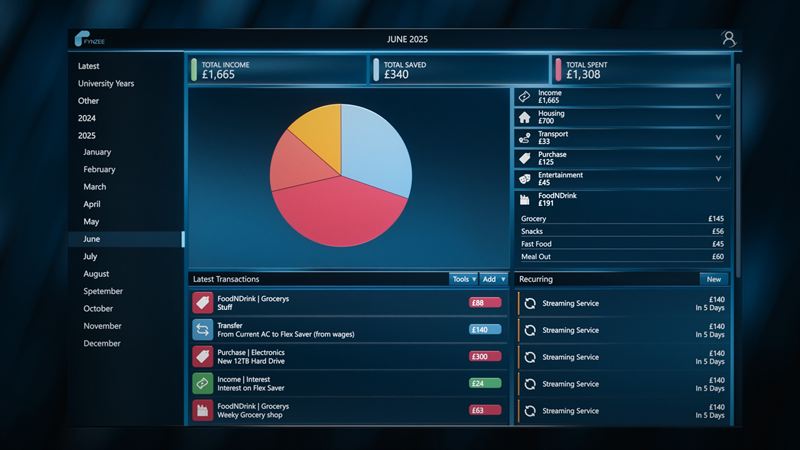
A roomy layout for your desk and a thumb-friendly one for your phone. Add a purchase on the bus and review the charts later on a big screen, with the same data in both places.
You enter the data, so you control it. Accurate categories without handing over bank access.
Break one purchase across several categories and subcategories for an honest picture of where money goes.
Keep receipt and invoice images safe in the cloud as a paper trail you can find later.
Start your trial today and see your spending clearly.